
Design the Brain of an AI Agent
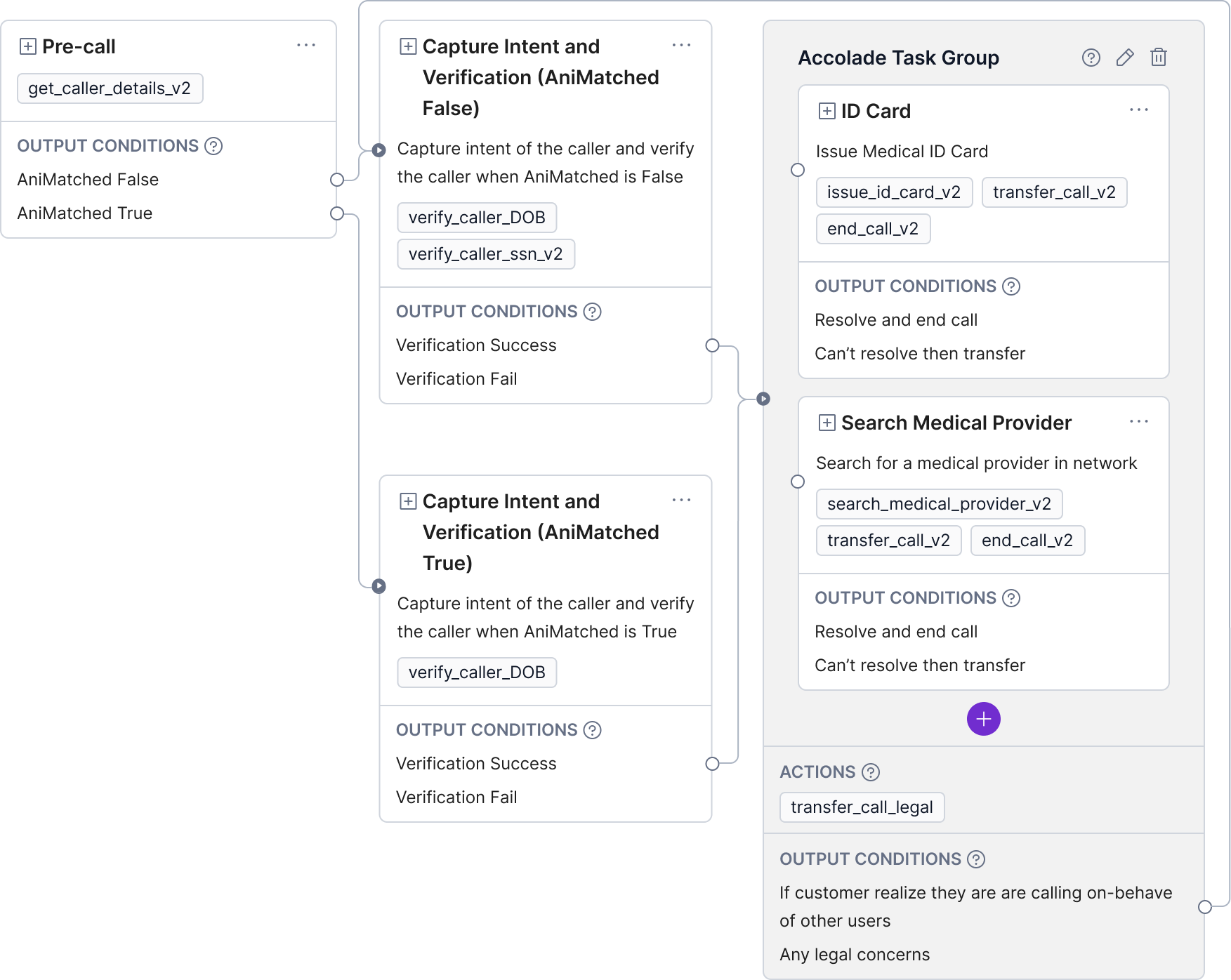
A systems level re-architecture that transformed a prompt-only approach into a scalable, enterprise-grade platform—enabling reliability, unlocking enterprise deals, and generating $8M ARR in the first year.
Role: Product Design Director
Being the IC designer who build the project from 0 to 1000, then hire designers to scale the operation. Lead product and ML eng team across product strategy, UX, system architecture, UI, and workflow logic.
Timeline: 2024 Q3 – 2025 Q4
Presentation Recording (16 mins) | Presentation Slides
Business Context of Observe.AI

Observe optimizes the three critical layers of contact center operations. While routine Tier 1 inquiries are automated via Voice and Chat AI, Tier 2 agents handling complex escalations are empowered by Real-Time Copilots that offer live guidance and automation. Finally, the Quality Assurance layer is enhanced through Post Interaction AI that evaluates agent empathy, knowledge, and conversation intelligence.
Eval is Everything, also its the center of the new GenAI product design prcess

1. Common Voice Agent Failures Despite high baseline quality, voice agents often struggle with:
Nuance: Mispronouncing acronyms (e.g., "UX") and numbers.
Environment: Inability to filter background noise.
Flow: Slow latency and getting "stuck in loops" when interrupted by users.
2. The GenAI Design Process Unlike traditional products, GenAI requires a specific workflow:
Prototyping: Use prompting and "vibe coding" early to define the shape of the experience.
Evaluation: Combine manual user spot-checks with AI agents to test quality at scale.
3. Operationalizing Fixes To improve the product, observe how internal teams (engineers/PMs) manually fix issues, then convert those solutions into standard configurations. The goal is to automate quality or give customers easy tools to fix issues themselves.
The "Not yet exist" Persona

1. The "Scrappy" MVP Strategy Rather than building a proprietary engine immediately, the team launched a consultancy service using a composite stack of existing tools (DeepGram, Vapi, 11 Labs). This approach allowed for rapid market entry and generated deep research insights before heavy engineering investment.
2. Defining the Ideal Persona A primary challenge was identifying who is best suited to build and manage these AI agents.
The Failed Hypothesis: Human Agent Supervisors were initially targeted because they understand quality customer service. However, they struggled with the technical aspects of software logic, troubleshooting, and iterative configuration.
The Validated Persona: Research confirmed that IT-focused Product Managers and software-literate Conversation Designers are the ideal users. Unlike supervisors, these profiles possess the "software mindset" required to successfully debug, iterate, and launch complex AI agents.
V0: Prompting - The training doc for AI Agents
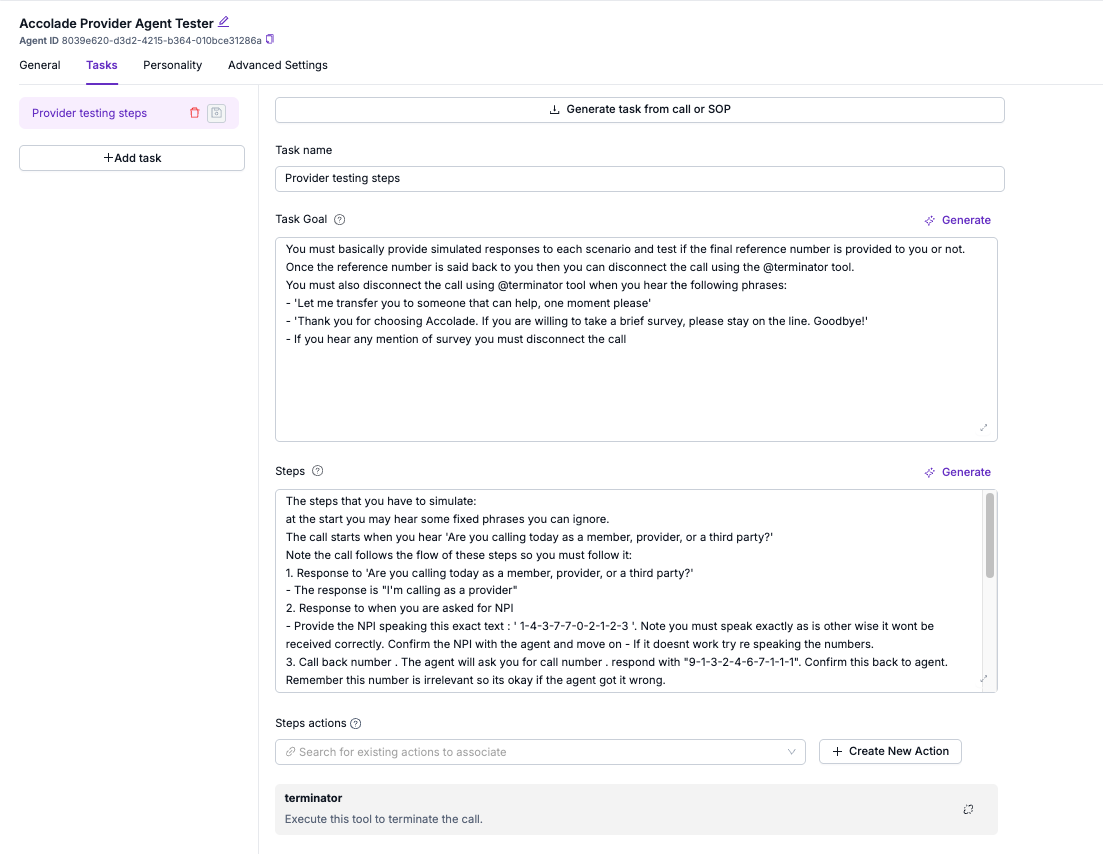
Core Value Proposition The company’s initial product prioritizes simplicity and speed, specifically targeting the SMB (Small and Medium Business) market. It allows users to deploy functional AI agents with 80–90% quality in just a few days.
Key Features & Workflow
SOP Integration: The platform is highly intuitive; users can simply copy and paste existing Standard Operating Procedures (SOPs) or human training documents into the input box to configure the agent's logic.
Step-by-Step Control: Users define operational flows top-to-bottom using natural language.
Tool Capabilities: The system supports technical extensions, allowing agents to utilize RAG (Retrieval-Augmented Generation) or external APIs to execute tasks.
The shadow from the past: Rule Base Chatbot
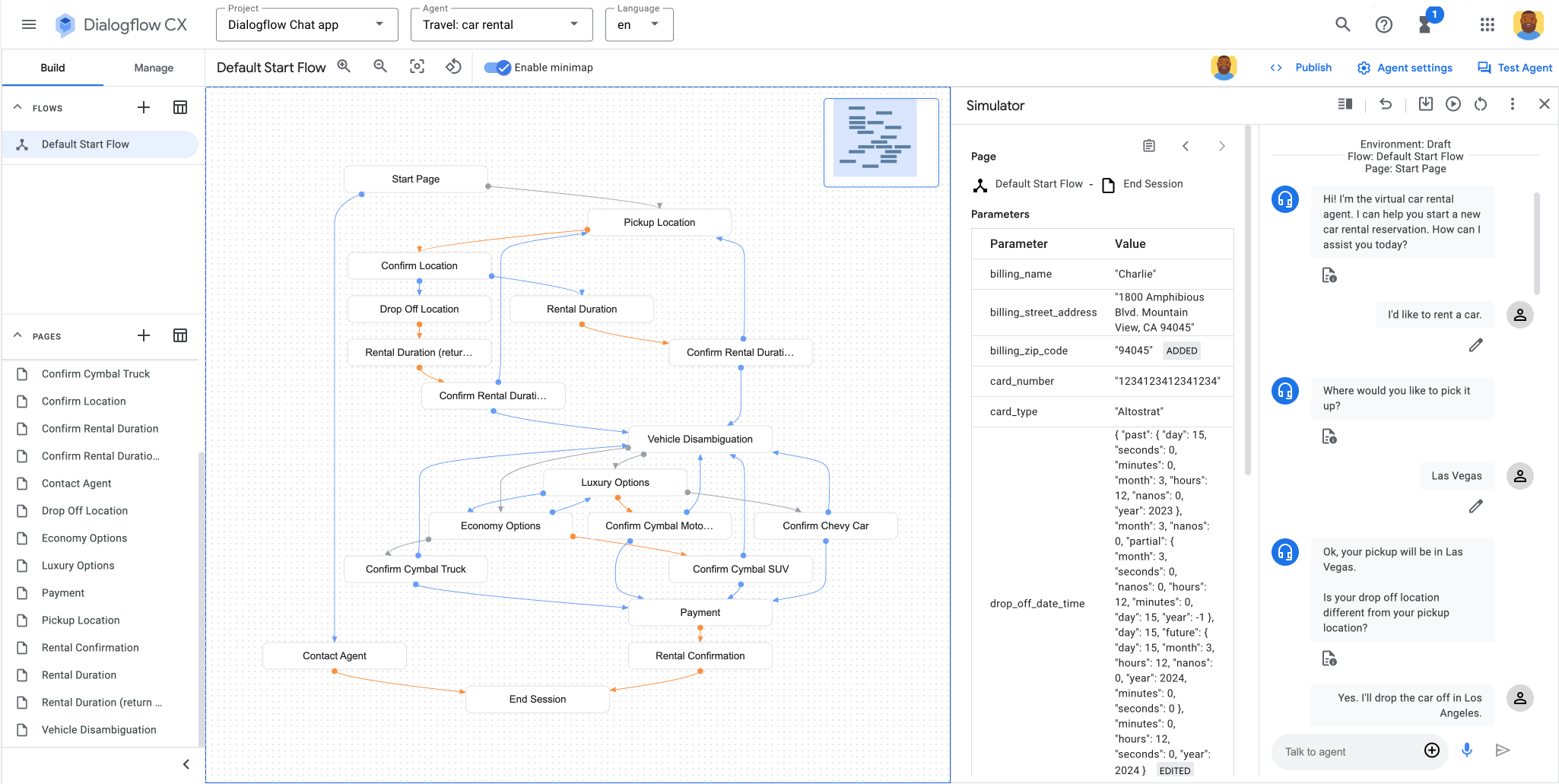
Our application is directly compare with the old-fashioned, rule-based chatbots (similar to the tools used by the DMV (IVR)). In my view, these legacy systems (like Google Dialogflow) are inferior for several reasons:
They are a "soup" of logic: I have to manually configure every single sentence and logic tree branch, which creates a messy and complicated system.
They are fragile: Because I have to build thousands of specific conversation nodes, the system breaks easily. If a customer goes "off track," I cannot easily get the conversation back on course.
They are robotic: The experience feels very mechanical to me, lacking the natural flow of our application.
Problem: The Paradox of Simplicity V.S. Deterministic
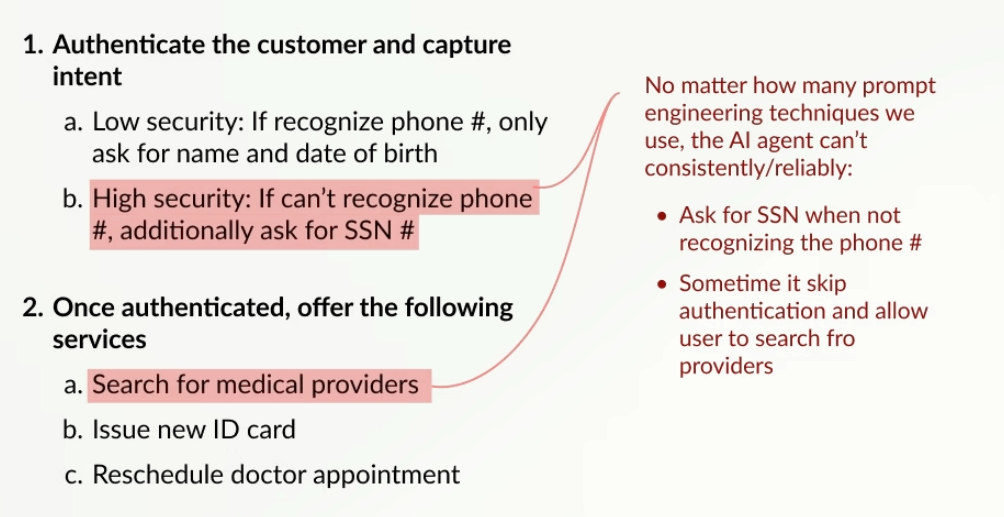
We encountered a significant roadblock that highlights the conflict between the simplicity of AI and the need for deterministic (strict) outcomes.
The Healthcare Example To illustrate this, I looked at a healthcare authentication flow where the logic must be precise:
Recognized Phone Number: We follow a lower security route (asking only for Name and Date of Birth).
Unrecognized Phone Number: We must follow a high-security route (asking for a Social Security Number).
The Failure of "Pure Prompt" AI Even after applying every prompt engineering technique on the market, I found the AI agent could not consistently execute these rules.
Inconsistency: In scenarios requiring an SSN, the AI only asked for it about 80% of the time.
Conclusion: While the pure prompt-based UI is easy to use, I found it too unreliable to handle complex, secure tasks that require 100% accuracy.
V1: Indented List, a Naive failure
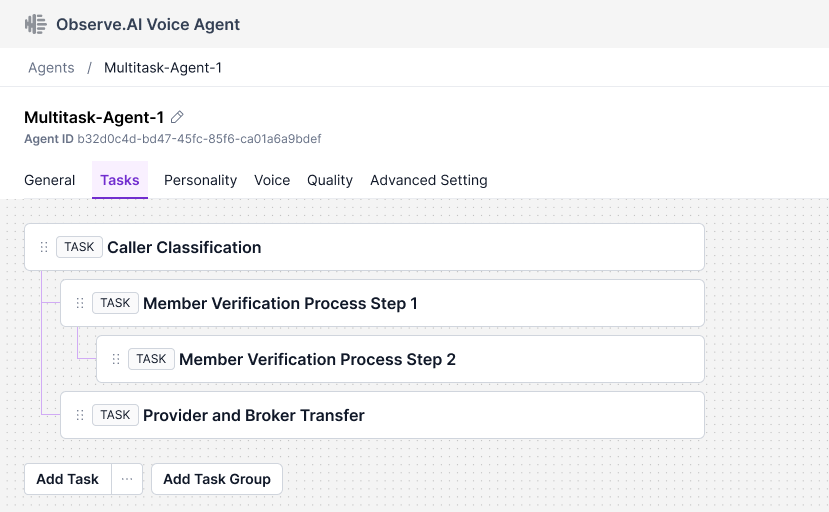
We began by trying to preserve the "joy" and simplicity of a standard document editor, keeping features like bullet points and indentation shortcuts. However, this approach resulted in failure due to a structural limitation:
The Logic Problem: A hierarchical list structure does not allow different branches to merge back together at the end (converging paths).
The Consequence: While the interface was simple and stable, it physically couldn't handle the complex routing required for the tasks we needed to execute.
V2: Workflow Topology Map, a usability Nightmare
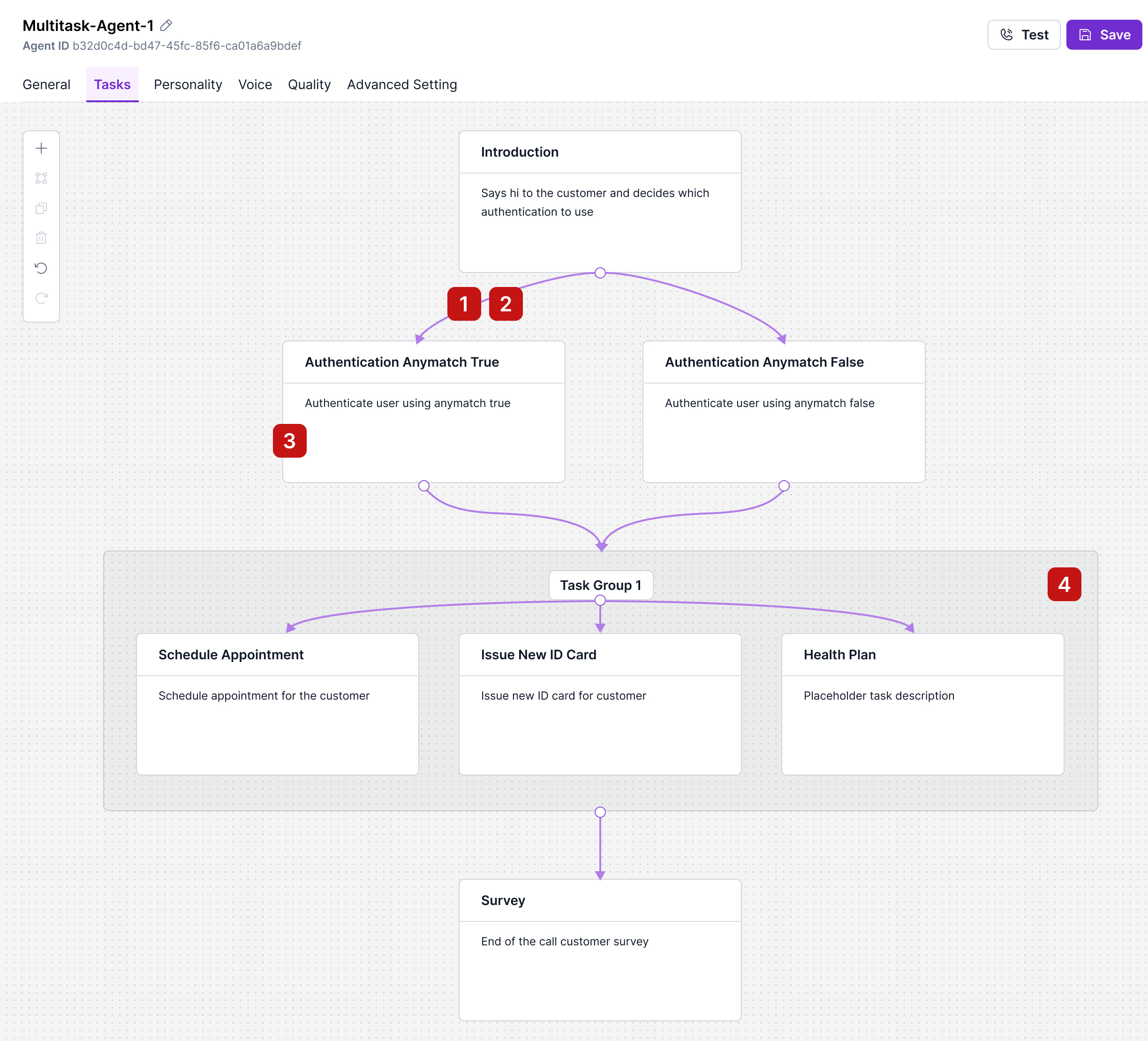
User have no idea they need to double click on the edge line to edit the Output Condition
In research, we found user usually consider the output condition, together with the task prompting
Lack of critical task information on the surface
User not able to understand what task group does and how to add task to it.
V3: A Humble GA
We recently shipped the current version to production, which solves our previous reliability issues by bundling output conditions directly with their source tasks. The key features include:
Integrated Logic: We can now execute precise routing (e.g., "Phone Match" vs. "No Match") directly on the surface layer, effectively treating task groups as self-contained "mini-agents."
Unified Context: The interface presents all goals, steps, and prompts in a single panel, allowing for easy cross-referencing of tasks without losing context.
Structured Precision: Crucially, we replaced vague natural language descriptions with structured Boolean logic for output conditions. This ensures that critical decision points (complex AND/OR logic) are executed with 100% reliability.
Early Market Reaction
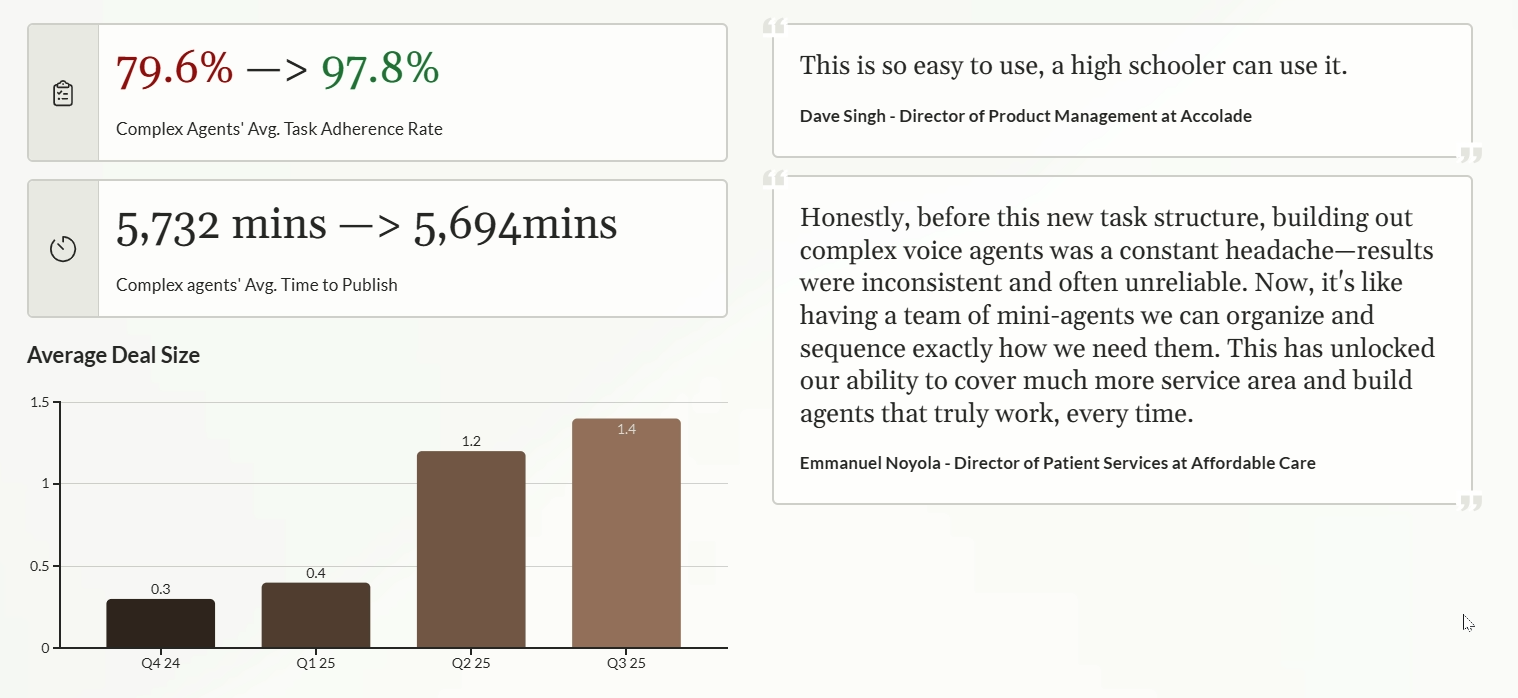
After tracking performance for a quarter, I have observed three major successes validating our new "task structure" approach:
Drastic Reliability Increase: Task adherence jumped from 80% (using the old pure-prompt method) to nearly 100%.
Maintained Usability: Despite my initial fears about a steep learning curve, the time-to-publish remains identical to the previous version, proving the system is still intuitive.
Business Expansion: This reliability has allowed us to move upmarket from SMBs into the Enterprise sector. Users now describe the tool as an easy-to-manage "team of mini agents."